How to Claim and Edit Your Google Knowledge Panel (With Screenshots)
If Google shows a Knowledge Panel for you, you don't own it — but you can claim it, verify that it's really you, and then suggest edits to fix what's wrong. I just went through the entire flow on my own panel, so this walkthrough uses the real screens you'll see, in order, plus what actually gets edits approved versus rejected.
This matters more than it used to. Your Knowledge Panel is one of the sources Google and AI assistants read to decide who you are, so a wrong title, a stale photo, or a missing link isn't cosmetic — it's a fact the whole web (and every LLM) may repeat. Claiming and cleaning it up is now part of basic entity authority.
First: do you actually have a Knowledge Panel to claim?
You can only claim a panel that already exists. Search your name (and your brand name) and look for the boxed profile on the right with a photo, a short description, and links. If you see a "Claim this knowledge panel" option, Google has generated an entity for you and you're eligible to verify it.
Not sure whether one exists, or what Google currently believes about you? The free Knowledge Panel checker shows what entity Google resolves for a name in about thirty seconds — a faster way to check than searching in and out of incognito. If you don't have a panel yet, claiming isn't the task; earning one in the first place is, and that's a different process.
How to claim your Google Knowledge Panel (step by step)
Step 1 — Open your panel and click "Claim this knowledge panel"
Signed into the Google account you want associated with the entity, find your panel and open the three-dot menu (⋮) near your name. Choose Claim this knowledge panel.
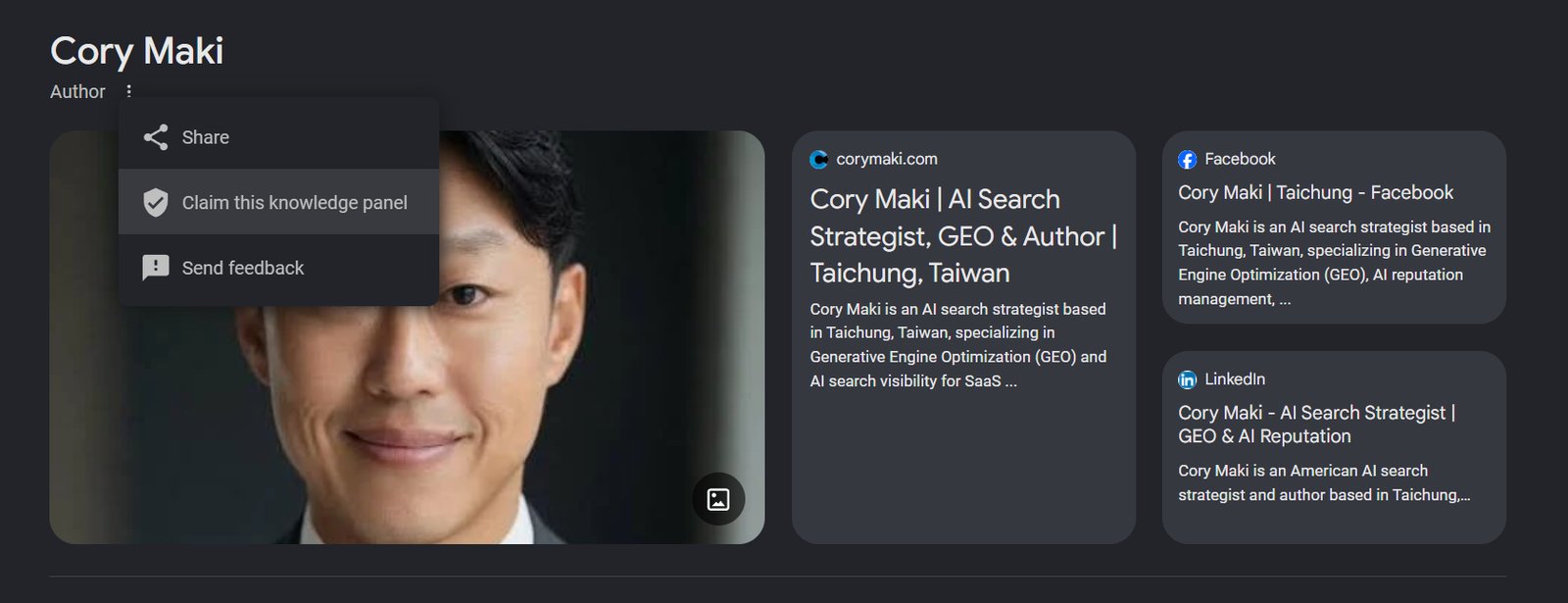 The claim option lives in the ⋮ menu at the top of your own Knowledge Panel.
Step 2 — Start the "Get verified on Google" flow
Claiming sends you to Google's verification landing page. Click Get Verified to begin. This is Google confirming you are who the panel says you are — not an approval of any edits yet.
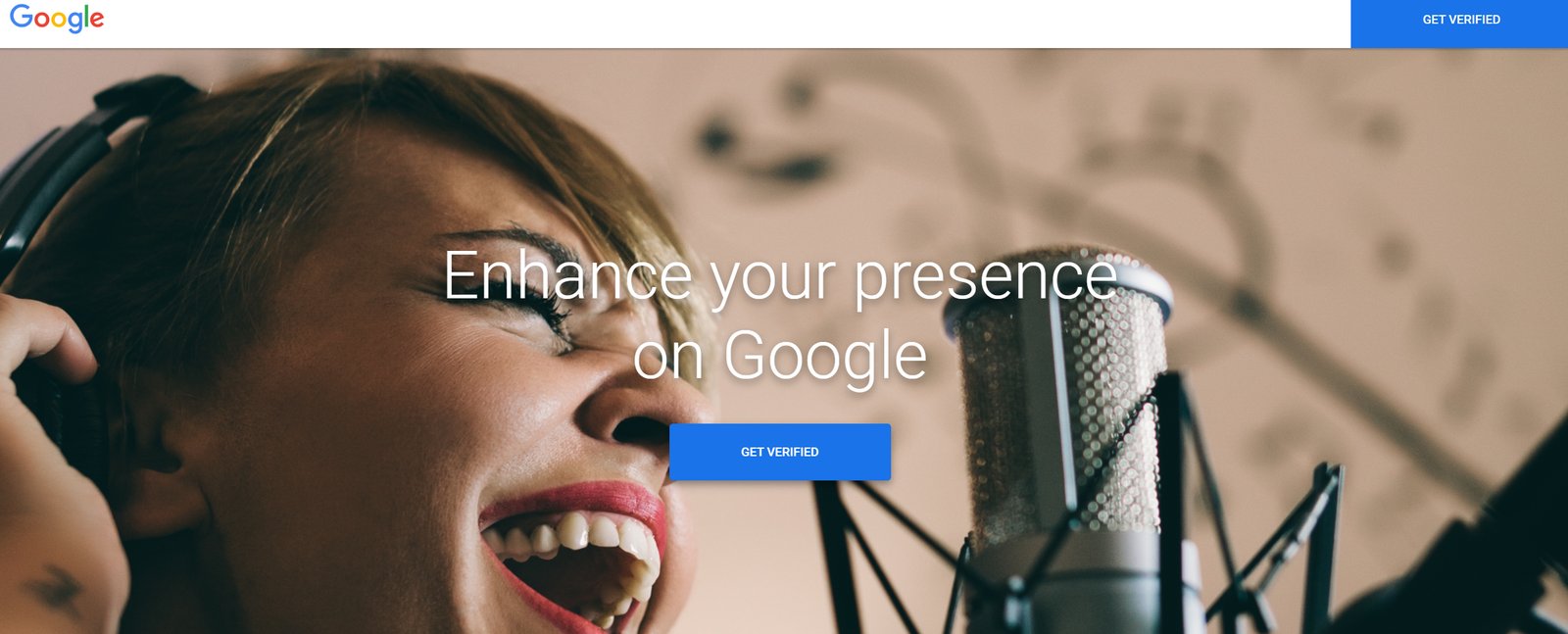 Claiming routes you into Google's identity-verification flow at g.co/verify.
Step 3 — Introductory info: confirm the entity is you
The first step asks whether the name on the panel is the person, organization, or entity you're claiming, and how you relate to it. For your own panel, choose Yes and "I am a person with a knowledge panel." (If you manage a panel for someone or something else — a company, a musician, a film — you'd pick the second option instead.)
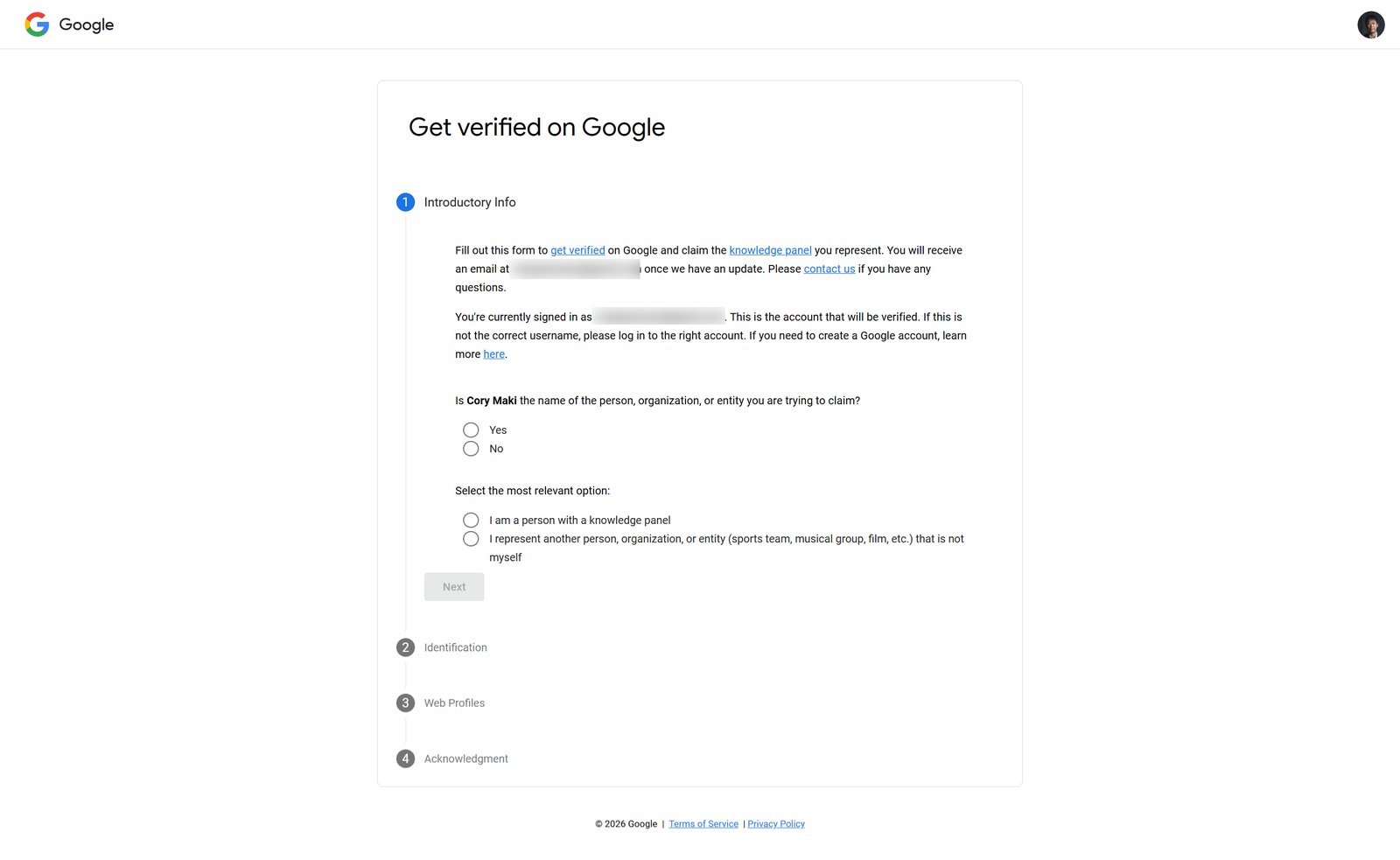 Step 1 establishes your relationship to the entity. Claiming your own panel is the simplest path.
Step 4 — Identification: prove it's you
This is the step people underestimate. Google requires a selfie holding a government-issued photo ID, plus your full legal name exactly as it appears on that ID. A few things that will save you a rejected attempt:
- The name you type must match the ID exactly.
- The photo must be sharp and well-lit; your whole face and the ID must be in focus and legible.
- Black out sensitive fields you don't need to show (national ID number, home address, date of birth) — Google explicitly allows this and says it deletes the document within 30 days.
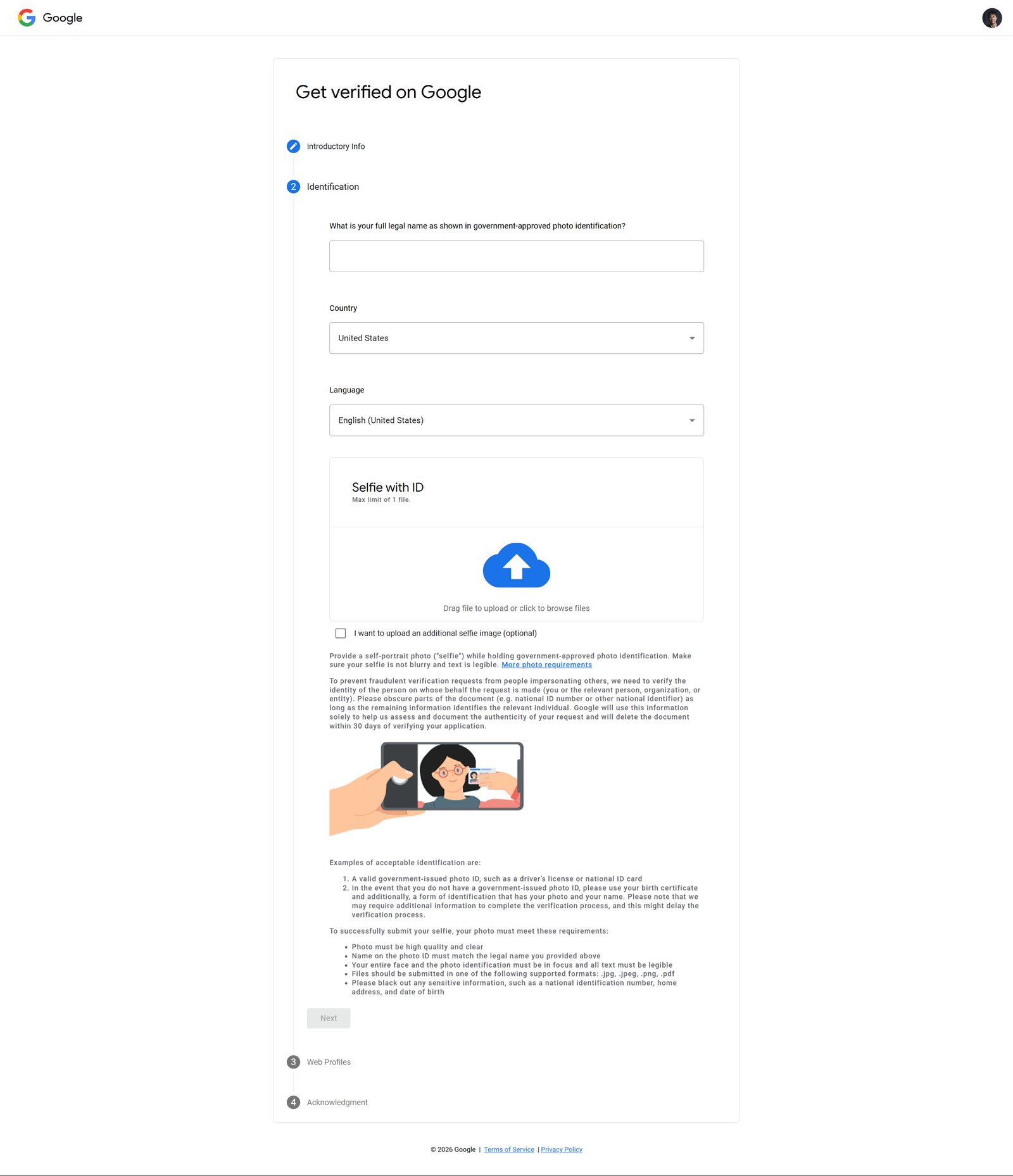 The identity check is a real ID verification, not a checkbox. Have a clear selfie-with-ID ready.
Step 5 — Web profiles, acknowledgment, and submit
The last steps let you add the official web profiles that confirm the entity — your website and social profiles — then acknowledge Google's terms and submit.
Make this step count: add the profiles you can actually prove you control, because that's what turns a claim into an easy approval. Two carry the most weight:
- Your main website — ideally one you're verified for in Google Search Console. Do this signed into the Google account that owns the site's Search Console property; that ties the domain to you directly. Have Search Console open in another tab so you can confirm ownership if Google follows up (a screenshot of the verified property is worth keeping).
- Your LinkedIn and other social profiles. Sign in, copy the exact profile URLs, and add them — adding accounts you're demonstrably logged into is far stronger than pasting links you can't show control of.
The through-line: the more of these profiles Google can independently verify as yours, the faster it can confirm you're the person the panel represents. Then acknowledge the terms and submit — you'll get a confirmation, and Google emails you the result.
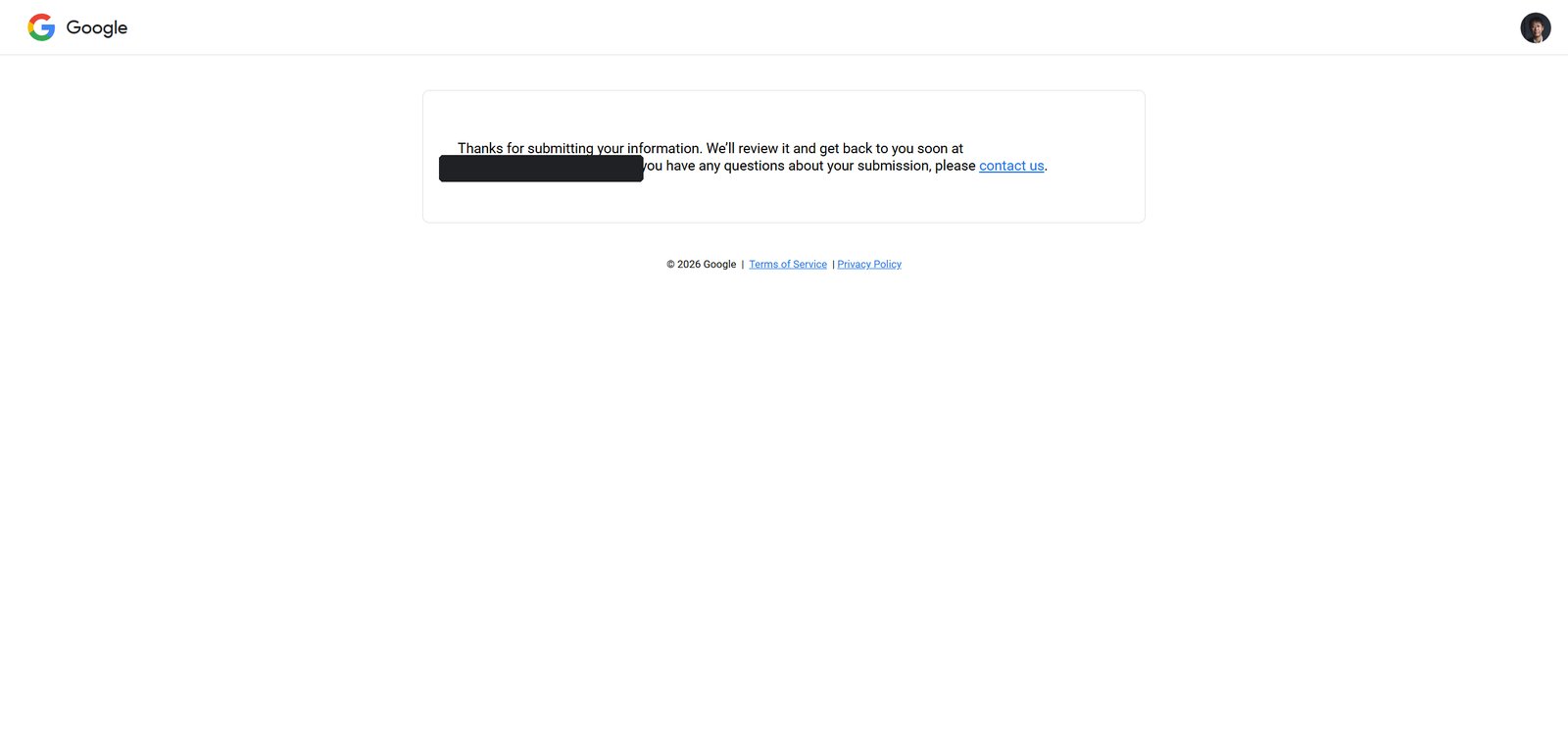 After submitting, Google reviews the request and emails you the result.
How long does approval take? Google says it varies — but in my own claim it was fast. The "Success! You've claimed your knowledge panel on Google" email landed in about an hour. A clean, mutually corroborating set of web profiles (Step 5) is almost certainly why it moved so quickly; thin or inconsistent profiles are what slow claims down or get them rejected.
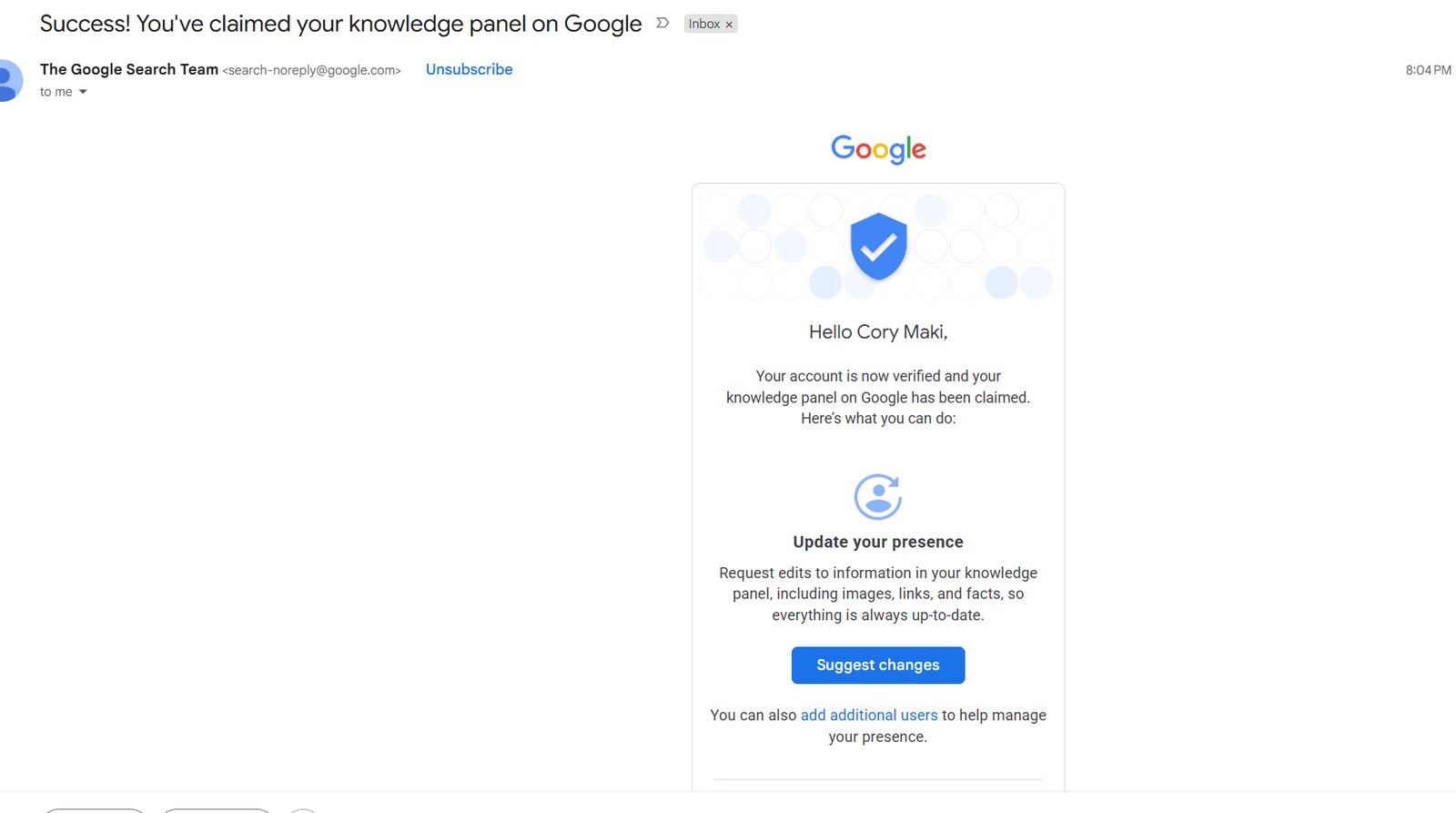 The real approval email — my claim came back verified in about an hour, and it unlocks the "Suggest changes" control.
Once approved, the panel is linked to your account and you unlock "Suggest changes" — the trusted edit channel Google reviews faster, and weighs more heavily, than anonymous feedback.
How to edit your Knowledge Panel once you're verified
Being verified doesn't hand you an editor — it hands you a trusted suggestion channel. To fix something, open your panel while signed in, use the feedback/edit option on the item you want changed, and submit the correction with the correct information. Google reviews it against the web before it goes live.
What you can usefully correct: a wrong or outdated photo, an inaccurate title or description, wrong birth/founding details, a missing or wrong official website, and social profile links. What you can't do is invent facts — which is the number-one reason edits fail.
Why Knowledge Panel edits get rejected
Almost every rejected edit comes down to the same thing: Google can't corroborate your change against the open web. The panel is a reflection of what authoritative sources say, not a form you control. Edits fail when:
- There's no source. You say your title is X, but no reliable third-party page says so. Fix the sources first, then suggest the edit.
- The change looks promotional. Marketing language and self-serving claims get filtered out. Panels carry neutral facts.
- Sources conflict. If different sites list different founding years or titles, Google hedges toward what it already has. Make the web consistent.
The real lever, in other words, is off the panel. If AI and Google are describing you wrong, the durable fix is correcting and reinforcing the underlying sources — your structured data and entity connections, your Wikipedia/Wikidata presence where warranted, and consistent facts everywhere your name appears. The panel updates to follow the evidence. This is the same corroboration-first logic that governs all of generative engine optimization: you don't edit the answer, you improve what the answer is built from.
Why this is worth doing now
A verified, accurate panel does three things at once: it makes you the authoritative source on yourself in Google, it feeds a clean, consistent entity to the AI assistants that increasingly read panels to answer "who is X," and it gives you a fast channel to correct errors before they propagate. In an AI-search world, being wrong about yourself in your own panel is a compounding problem. Claiming it is the first step to controlling it.
If you're not sure what Google currently resolves for your name — or a client's — start by checking the panel and entity, then work the sources from there.
Frequently asked questions
How do I claim my Google Knowledge Panel?
Sign into your Google account, search your name, open the three-dot menu on your Knowledge Panel, and choose 'Claim this knowledge panel.' You'll go through Google's 'Get verified' flow: confirm the entity is you, verify your identity with a selfie holding a government photo ID, add official web profiles, and submit. Google reviews it and emails you the result.
How do I edit my Google Knowledge Panel?
You can't edit it directly. Once you're verified as the entity, you gain a trusted channel to 'suggest changes' — open the panel while signed in, use the feedback/edit option on the item, and submit the correct information. Google reviews the suggestion against the web before publishing it.
Why does Google keep rejecting my Knowledge Panel edits?
Almost always because Google can't corroborate the change against reliable third-party sources. Edits fail when there's no independent source for your claim, the change reads as promotional, or sources conflict. Fix and align the underlying web sources first, then suggest the edit.
Do I really need to upload a photo ID to claim my panel?
Yes. Google's verification requires a selfie holding a government-issued photo ID, with your legal name matching the ID. You're allowed to black out sensitive fields you don't need to show, and Google says it deletes the document within 30 days of verifying your request.
I don't have a Knowledge Panel — can I still claim one?
No. You can only claim a panel that already exists. If Google hasn't generated one for you, the task is earning one through entity authority — consistent structured data, authoritative references, and notable coverage — not claiming.
What web profiles should I add when claiming my Knowledge Panel?
Add the official profiles you can prove you control. The strongest are your main website — ideally one you're verified for in Google Search Console, done while signed into the account that owns that property — and your logged-in social profiles like LinkedIn, added with their exact URLs. The more profiles Google can independently verify as yours, the faster it confirms the claim.
How long does it take to claim a Google Knowledge Panel?
Google says timing varies, but it can be quick. In a real claim for a clearly-identifiable person with consistent, verifiable web profiles, approval arrived in about an hour, confirmed by a 'Success! You've claimed your knowledge panel on Google' email. Thin or inconsistent profiles are what slow a claim down or get it rejected.
References

Cory Maki is an AI search strategist based in Taichung, Taiwan, specializing in GEO, AI reputation management, and AI branding for SaaS founders. Author of Reddit, AI Overviews & GEO and creator of the ARC Method. Read more →